
If you want to write better, faster, and easier, you need to check out Grammarly. Grammarly is an AI powered writing tool that helps you with all parts of your writing from start to finish. You can use it to brainstorm new topics, outline ideas, and also revise and polish your writing. It’s kind of like having your own personal proofreader and editor follow you around anytime you write. And best of all, it’s completely free to get started with.
In this blog post, I’ll show you how to use Grammarly to improve your writing in three simple steps. I’ll also share some tips and tricks along the way. Let’s get started!
Step 1: Get Grammarly
The first step is to get Grammarly. You can do this by going to https://www.grammarly.com/kevinstratvert and signing up for a free account. You can also download Grammarly’s browser extension for Chrome, Firefox, Safari, or Edge. This will allow you to use Grammarly on any website you visit, such as Gmail, Facebook, Twitter, or WordPress.
Once you have Grammarly installed, you’ll see a green icon in the bottom right corner of any text box you type in. This means that Grammarly is working and ready to help you.
Step 2: Use Grammarly on Desktop
The next step is to use Grammarly on your desktop. You can do this by opening the Grammarly app on your computer or by logging into Grammarly’s online editor. Here, you can create a new document or upload an existing one.
As you type or paste your text, Grammarly will automatically check your writing for spelling, grammar, punctuation, and clarity errors. You’ll see red underlines for critical issues and blue underlines for suggestions. To see what Grammarly has to say about each issue, just hover over the underline or click on it.
You’ll also see a sidebar on the right side of the screen with an overall score and some feedback on your writing. You can use the tabs at the top of the sidebar to switch between different categories of feedback, such as correctness, clarity, engagement, and delivery.
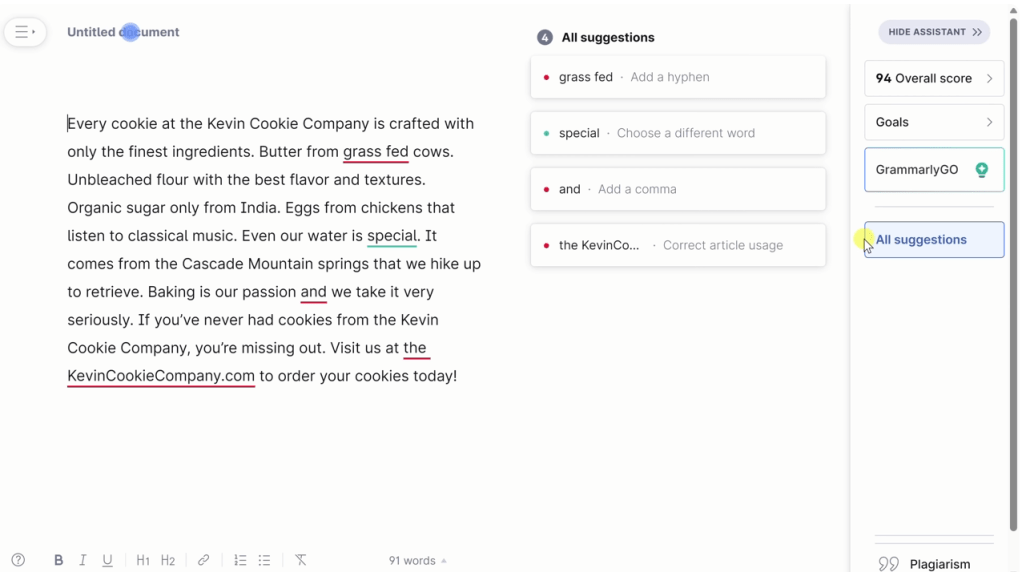
You can apply or dismiss any suggestion by clicking on it or using the keyboard shortcuts. You can also ignore any issue by clicking on the trash icon or pressing the ESC key.
Grammarly will also help you improve your vocabulary and tone by offering synonyms and tone indicators. You can access these features by double-clicking on any word or by clicking on the emoji icon at the bottom of the sidebar.
Grammarly now uses artificial intelligence techniques to analyze and improve your writing. It works by using natural language processing (NLP) to understand the meaning and context of your text, and machine learning (ML) to learn from millions of real-world examples of good writing. It then uses generative AI to create suggestions for you based on your writing goals, style, and tone. You can use Grammarly AI to write faster, clearer, and more engaging texts in any genre or domain.
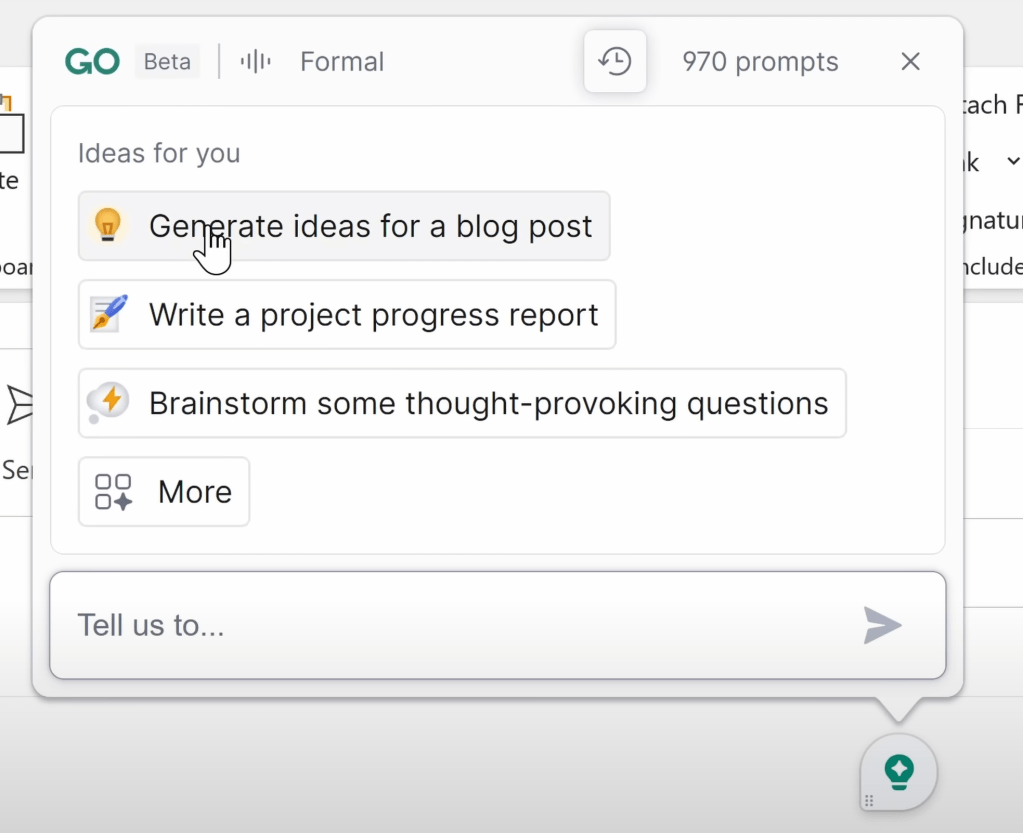
Step 3: Use Grammarly on Web and Mobile
The last step is to use Grammarly on web and mobile. You can do this by using Grammarly’s browser extension or by downloading Grammarly’s keyboard app for iOS or Android.
With Grammarly’s browser extension, you can use Grammarly on any website you visit, such as Gmail, Facebook, Twitter, or WordPress. You’ll see the same green G icon in the bottom right corner of any text box you type in. Just click on it to open Grammarly’s pop-up editor and see your suggestions.
With Grammarly’s keyboard app, you can use Grammarly on any app you use on your phone or tablet, such as WhatsApp, Instagram, or Notes. You’ll see the same red and blue underlines as you type. Just tap on them to see your suggestions and swipe left or right to apply or dismiss them.

Tips and Tricks
Here are some tips and tricks to make the most out of Grammarly:
- You can customize your writing goals by clicking on the target icon at the bottom of the sidebar. Here, you can choose your audience, formality, domain, tone, and intent for your writing.
- You can access more advanced features by upgrading to Grammarly Premium. This will give you access to more suggestions on word choice, sentence structure, readability, plagiarism detection, and more.
- You can learn more about grammar rules and writing tips by visiting Grammarly’s blog or Grammarly’s YouTube channel. Here, you can find helpful articles and videos on various topics related to writing.
Conclusion
Grammarly is an amazing tool that can help you improve your writing in many ways. Whether you’re writing an email, a blog post, a resume, or a novel, Grammarly can help you write with confidence and ease.
If you haven’t tried Grammarly yet, I highly recommend that you give it a try today. It’s free to get started and easy to use. Just go to Grammarly’s website and sign up for a free account.
I hope this blog post was helpful for you. If you have any questions or comments about Grammarly or this blog post, feel free to leave them below. I’d love to hear from you.
Happy writing! 😊
 Kevin Stratvert